Private by default · For Mac
Every rupee you spend, already on your Mac.
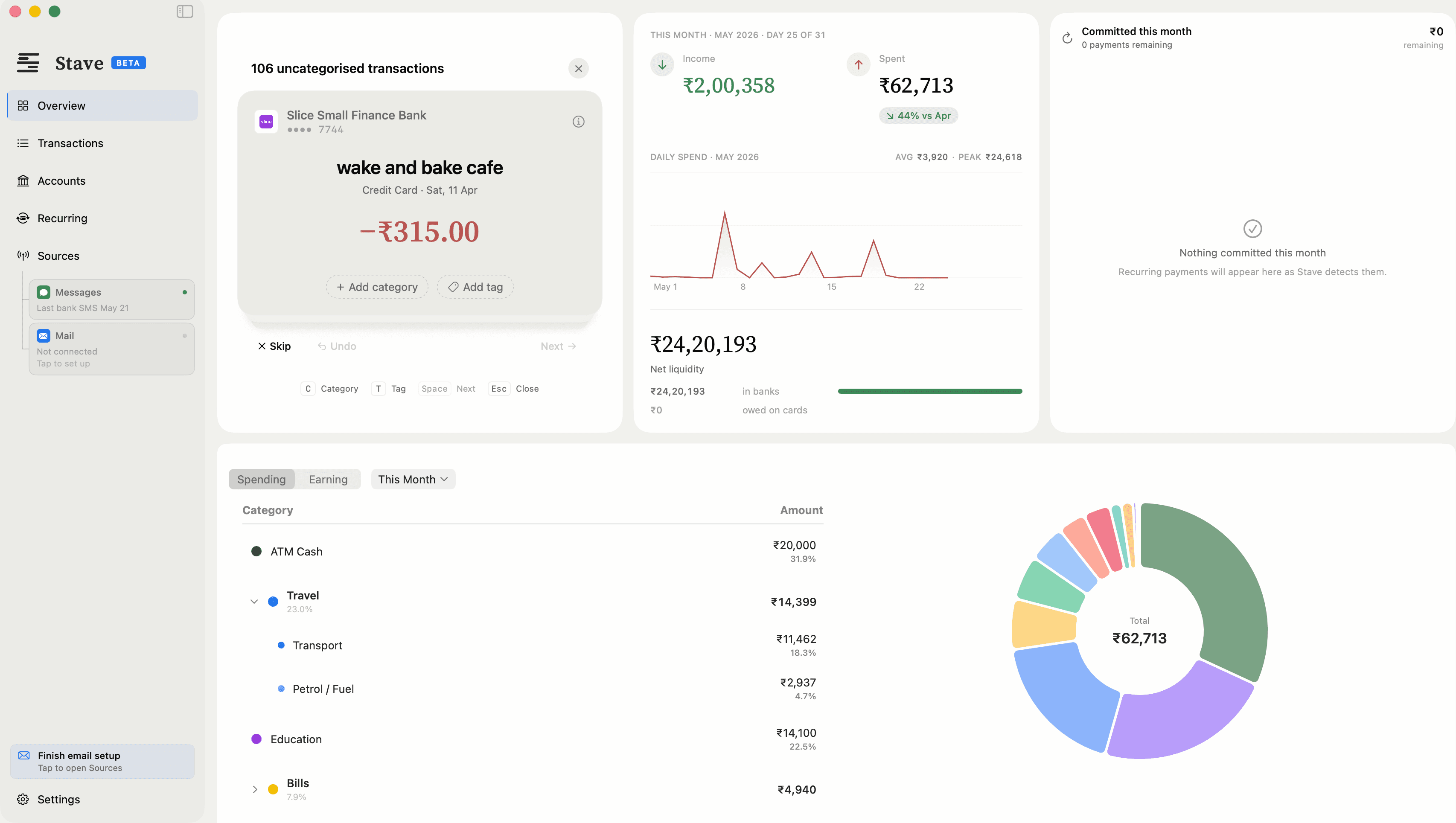
Stave reads the transaction alerts your bank sends you and builds your transaction history on your Mac.


Private by default • No bank logins • Processed on your Mac by default
Requires macOS 14 or later
How it works
Authorise once.
Stave reads your bank's transaction SMS from Messages and statements from Apple Mail on your Mac. You confirm your accounts and card last-4 digits once. Only messages from banks are parsed. Messages that don't look like bank transactions are ignored.
Everything happens on your Mac.
No data mining. Where other finance tools parse your data on their servers, Stave reads and sorts every transaction on your Mac's own chip by default.
Clear the deck.
New transactions land in a review inbox, ready to go. Use keyboard shortcuts to categorise, tag, and take the list to zero.
Under the hood
The whole pipeline, inside one machine.
Your Mac
Messages & Mail
Bank SMS and PDF statements your bank already sends you
Stave
Parses and categorises every transaction on-device
Your ledger
Stored on your Mac, and in your iCloud if you turn on sync
Your transactions are processed on your Mac by default. The direct download also contacts getstave.app for update checks, licence checks, statement outlines you choose to send and, if you turn it on, Smart Assist, and downloads updates from GitHub. The Mac App Store edition contacts only Apple. Check it yourself with a network monitor such as Little Snitch.
Philosophy
Taken individually, they are just transactions. Taken together, they tell your story. Your financial history belongs to you.
Also included
Auto-categorisation
Transactions sorted the moment they arrive
PDF statements
Import bank statements from Apple Mail
Recurring payments
Subscriptions and bills tracked automatically
iCloud sync
Optional — keep Mac and iPhone in sync
Tags and notes
Add context to any transaction
Spending charts
Monthly overview at a glance
Multiple accounts
All your banks and cards in one place
Free trial
3 months free. Cancel anytime.
Pricing
Simple, honest pricing.
Stave Pro
3-month free trial. Cancel anytime.
- Pro intelligence — Recurring-payment detection and natural-language search
- On-device processing by default — No account required
- Private by default — No bank logins
- iPhone companion app (planned) — Review transactions on your iPhone
Free while in beta. After that, the same 3-month free trial as everyone.
Core tracking stays free forever. No account required. 14-day refund policy.
People often ask
(for anything else, email us at stave@avysion.studio)
- No. Stave never connects to your bank, never asks for your bank login, and never accesses your account directly. It reads the SMS alerts your bank already sends you — messages that are already on your Mac via Apple Messages.
- No. Stave only parses messages from bank sender IDs — like HDFCBK or ICICIB. Messages that don't look like bank transactions are ignored.
- Your transactions, balances, and account numbers stay on your Mac. Stave parses everything locally. On the direct download it also checks getstave.app for updates and your licence, downloads updates from GitHub, and sends diagnostics to Stave's own Apple CloudKit database. Diagnostics are counts and feature events tied to a random install ID, on by default, and you can turn them off in Settings. Install and session records (Mac model, region, how long Stave stays open) are always sent so we can count users. If you turn on Smart Assist, merchant names and the wording of messages Stave couldn't read (numbers removed) go to getstave.app. If Stave can't read a statement's layout, you can choose to send us a masked outline of it. The privacy policy lists every connection. Don't take our word for it: run Stave alongside a network monitor like Little Snitch and watch.
- Two things, both granted by you during setup: the Apple Messages database (where your bank SMS already live) and your Apple Mail folder (for PDF statements). Nothing else — no Full Disk Access, no contacts, no browsing data. You can revoke either at any time.
- Any Indian bank that sends SMS transaction alerts is supported — HDFC, ICICI, SBI, Axis, Kotak, Standard Chartered, Slice, and many more. If your bank sends you an SMS when you spend, Stave can read it.
- Yes. Stave reads and categorises transactions without a connection. A connection is used for iCloud sync, update checks and, in the direct download, the Pro licence check and Smart Assist if you turn it on.
- Fully supported. Stave tracks credit card transactions, outstanding balances, and payment due dates from your bank SMS.
- Yes. Stave comes in two editions: the Mac App Store edition and the direct download from getstave.app. Both read bank SMS from Messages and statements from Apple Mail on your Mac. The direct download is signed with an Apple Developer ID and notarised by Apple. Install one edition per Mac.
- Yes. The core app — tracking, categorisation, history — is free and stays free. Stave Pro (recurring-payment detection, natural-language search) comes with a 3-month free trial, no payment details required. Subscribe only if it earns its keep.
- Stave includes a statement parser (pdfplumber, PyMuPDF, pandas) so PDF and CSV files are read on your Mac rather than uploaded. The download happens once.
Download Stave
Two editions of the same app. Choose one.
The direct download starts immediately. No email required.
| Mac App Store | Direct download | |
|---|---|---|
| Updates | Through the App Store. | In the app. Automatic checks are on by default and can be turned off. |
| Stave Pro billing | Through your Apple Account. Apple handles billing, cancellation and refunds. | Through Razorpay at getstave.app, with a licence key sent by email. |
| Free trial | 3-month introductory offer for new subscribers. | Free while the beta runs. After the beta, a 3-month free trial with no payment details. |
| Smart Assist | Not included. | Optional, off by default. |
| Analytics | None. App Store privacy label: Data Not Collected. | Diagnostics on by default and can be turned off. Install and session records are always sent. |
| Requires | macOS 14 or later. | macOS 14 or later. |
Both editions read bank SMS from Messages and statements from Apple Mail on your Mac, and include the same free and Pro features.
Which should I choose? The App Store edition if you want Apple to handle updates and billing. The direct download if you want a licence key and the optional Smart Assist.
Subscriptions and free trials are per edition. A subscription in one does not unlock the other.
Install one edition per Mac.