Private by default · For Mac
Every rupee you spend, already on your Mac.
Stave reads the transaction alerts your bank sends you — and builds your complete ledger on-device. No bank logins. Private by default. Processed on your Mac.
Free during beta • Private by default • No bank logins • Processed on your Mac
How it works
Authorise once.
Stave reads your bank's transaction SMS from Messages and statements from Apple Mail on your Mac. You confirm your accounts and card last-4 digits once. Only messages from banks are parsed. Your personal conversations are never stored or sent anywhere.
Everything happens on your Mac.
No data mining. Where other finance tools parse your data on their servers, Stave reads and sorts every transaction on your Mac's own chip by default.
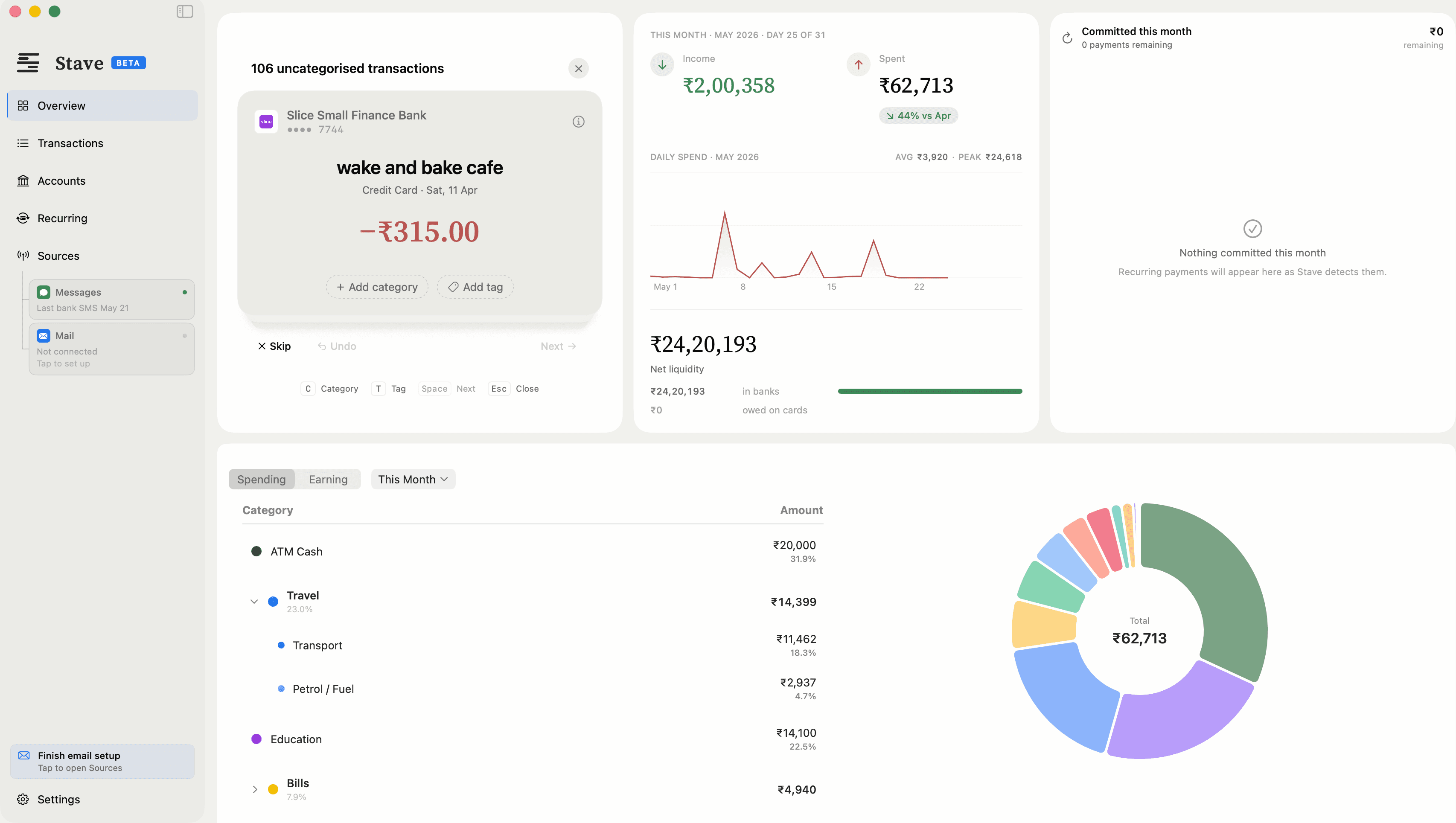
Clear the deck.
New transactions land in a review inbox, ready to go. Use keyboard shortcuts to categorise, tag, and take the list to zero.
Under the hood
The whole pipeline, inside one machine.
Your Mac
Messages & Mail
Bank SMS and PDF statements your bank already sends you
Stave
Parses and categorises every transaction on-device
Your ledger
Stored on your Mac, yours alone
Your transactions are processed on your Mac. The direct download also contacts getstave.app for update checks, licence checks, statement outlines you choose to send and, if you turn it on, Smart Assist, and downloads updates from GitHub. The Mac App Store edition contacts only Apple. Check it yourself with a network monitor such as Little Snitch.
Philosophy
Taken individually, they are just transactions. Taken together, they tell your story. Your financial history belongs to you.
Also included
Auto-categorisation
Transactions sorted the moment they arrive
PDF statements
Import bank statements from Apple Mail
Recurring payments
Subscriptions and bills tracked automatically
iCloud sync
Optional — keep Mac and iPhone in sync
Tags and notes
Add context to any transaction
Spending charts
Monthly overview at a glance
Multiple accounts
All your banks and cards in one place
Free trial
3 months free. Cancel anytime.
Pricing
Simple, honest pricing.
Stave Pro
3-month free trial. Cancel anytime.
- Pro intelligence — Recurring-payment detection and natural-language search
- On-device processing by default — No account required
- Private by default — processed on your Mac
- iPhone companion app (later this year) — Review transactions on your iPhone
Free while in beta. After that, the same 3-month free trial as everyone.
Core tracking stays free forever. No account required. 14-day refund policy.
People often ask
(for anything else, email us at stave@avysion.studio)
- No. Stave never connects to your bank, never asks for your bank login, and never accesses your account directly. It reads the SMS alerts your bank already sends you — messages that are already on your Mac via Apple Messages.
- No. Stave only parses messages from bank sender IDs — like HDFCBK or ICICIB. Your personal conversations are never stored, indexed, or sent anywhere.
- Your transactions, balances, and account numbers stay on your Mac. Stave parses everything locally. On the direct download it also checks getstave.app for updates and your licence, downloads updates from GitHub, and sends diagnostics to Stave's own Apple CloudKit database. Diagnostics are counts and feature events tied to a random install ID, on by default, and you can turn them off in Settings. Install and session records (Mac model, region, how long Stave stays open) are always sent so we can count users. If you turn on Smart Assist, merchant names and the wording of messages Stave couldn't read (numbers removed) go to getstave.app. If Stave can't read a statement's layout, you can choose to send us a masked outline of it. The privacy policy lists every connection. Don't take our word for it: run Stave alongside a network monitor like Little Snitch and watch.
- Two things, both granted by you during setup: the Apple Messages database (where your bank SMS already live) and your Apple Mail folder (for PDF statements). Nothing else — no Full Disk Access, no contacts, no browsing data. You can revoke either at any time.
- Any Indian bank that sends SMS transaction alerts is supported — HDFC, ICICI, SBI, Axis, Kotak, Standard Chartered, Slice, and many more. If your bank sends you an SMS when you spend, Stave can read it.
- Yes. Stave reads and categorises transactions without a connection. A connection is used for iCloud sync, update checks and, in the direct download, the Pro licence check and Smart Assist if you turn it on.
- Fully supported. Stave tracks credit card transactions, outstanding balances, and payment due dates from your bank SMS.
- The App Store sandboxes apps from accessing Apple Messages data. Stave needs direct access to read your SMS — which requires distributing outside the App Store. This is a deliberate technical decision, not a workaround. Stave is signed with an Apple Developer ID and notarised by Apple, so Gatekeeper verifies every build before it runs.
- Yes. The core app — tracking, categorisation, history — is free and stays free. Stave Pro (recurring-payment detection, natural-language search) comes with a 3-month free trial, no payment details required. Subscribe only if it earns its keep.
- Stave includes a statement parser (pdfplumber, PyMuPDF, pandas) so PDF and CSV files are read on your Mac rather than uploaded. The download happens once.
Download Stave
Free while in beta. The download starts immediately — no email required.
Free during beta • Private by default • No bank logins • Processed on your Mac